Product
Optrak Strategic Workbench
Answer the what-if question yourself
Last updated: 2026-08-17
The Optrak Strategic Workbench answers the question “what would happen if we changed this?” — a different fleet, a different depot, a new contract, a tighter delivery window — by running the change through the same optimiser that plans your live operation and putting the two results side by side. The record of every plan you have already run sits behind it, so the baseline you measure a change against comes from the same place as the change.
It is a separate product from the daily planning platform, but not a separate model. That matters more than it sounds. Most operators end up with two views of their fleet: a planning team running the optimiser, and a strategy team running spreadsheets. The spreadsheets simplify away the constraints the operation spent years learning, which is exactly where a strategic decision surprises everyone on contact with reality — the depot move that modelled a saving but breaks two profitable rounds.
The other half of the problem is access. A finance director wanting a number on a fleet reduction, or a bid team wanting a marginal cost by Friday, has to queue for whoever can build and run the scenario. So the question waits, or it gets settled on a spreadsheet instead.
What You Do in It
- Query what you have already run. Every plan the operation has run is kept in the data warehouse — the dataset it ran against, the optimised snapshot that came out, route-level detail and KPIs. The workbench is how you reach it: summaries across datasets and ad-hoc pivots, without writing SQL. Cost to serve by customer for the last quarter is a question about the record, not a scenario.
- View and compare. Your datasets in one place — KPIs, routes, map, timeline — with two snapshots side by side on cost, CO₂, vehicle utilisation, driver hours and feasibility.
- Load your own data. Strategic work starts with a spreadsheet: candidate vehicles, a prospective contract’s drops, a new depot. Upload the Excel file or a CSV; the workbench profiles the columns, you say which column feeds which field, and it checks the result (including UK mainland postcode lookup) and shows you the import before it lands.
- Clone and adjust. Copy a live dataset and change it. Four changes are ready to fill in — the fleet, a depot’s position, when drivers work, how wide a site’s delivery window is — and each one names the records it will touch, either by code or by a condition such as every vehicle over 20 tonnes. You see each record before and after, and nothing is written until you say so. Every record edited this way is proved to be the original plus exactly the change you asked for and nothing else, so the copy stays a faithful variant of what you started from.
- Run the optimiser. The same batch engine production uses, across one dataset or several.
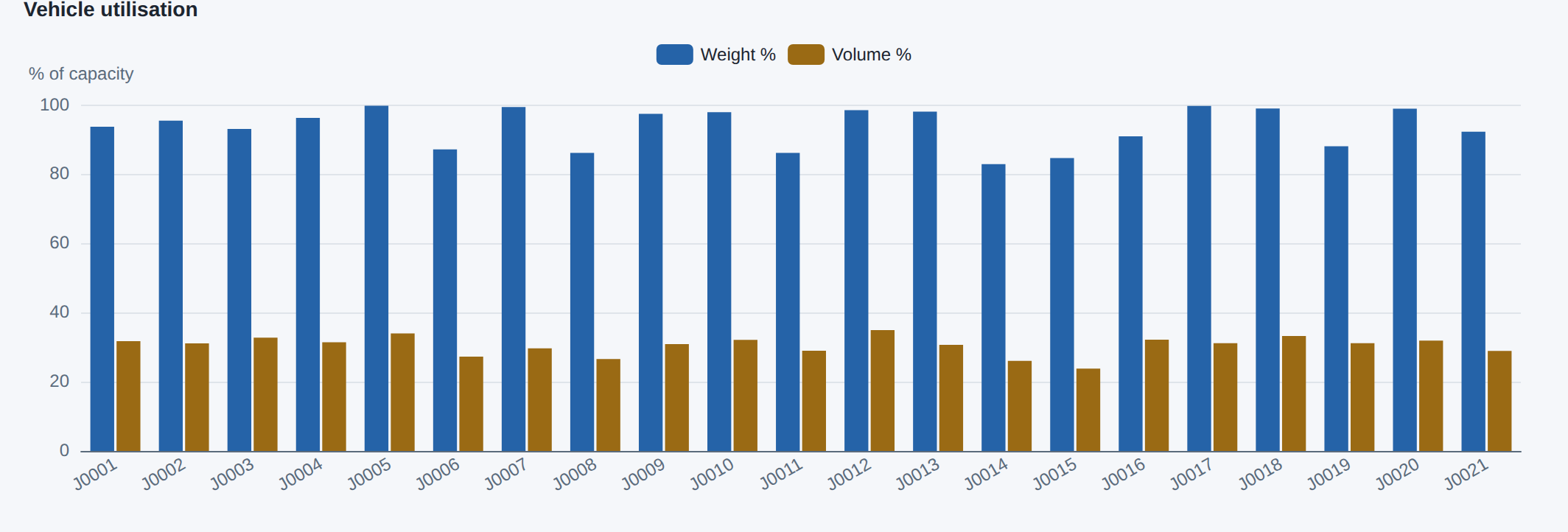
Every journey in one plan, by how much of the lorry’s weight limit (blue) and space (brown) its load uses. All 21 reach 83% or more of the weight limit while filling only 24% to 35% of the space.
Inside it is an experimental AI agent window that carries those same steps from a plain-language request. It runs on Anthropic’s Claude against a closed set of tools, every change it proposes goes to a person for approval, and there is a spending limit per customer.
The Questions It Is Built For
Fleet changes and electric transition. Bidding for new business, where what you need is the marginal cost of fitting the work into the operation you already run. Depot relocation. Shift patterns. Service levels, which are mostly time-window width, and worth pricing deliberately. Customers whose cost to serve runs ahead of what they contribute.
Strategic modelling sets out each of these and how a scenario is built.
Worked Example: Pricing a New Contract
A 3PL bid team has to price a new chilled contract by the end of the week. The number that matters is the marginal cost of fitting the work into the operation they already run, and getting it has meant booking time with whoever runs the optimiser.
In the workbench the bid lead does it directly. They import the contract’s drops from a spreadsheet; the workbench geolocates the postcodes, maps them to orders, and puts the import up for review. They clone last month’s live dataset, add the contract, and add two chilled vehicles through a reviewed edit. They run an optimisation across the month and compare the two results: the marginal cost of the contract, the three days that would have needed spot-hire, the change in utilisation.
That is a defensible bid number by the afternoon, produced by the optimiser the operation already trusts rather than a spreadsheet estimate. The experimental agent window can carry several of those steps from one plain-language request, with each action still put to a person for approval.
How It Is Delivered
As part of your Optrak deployment, over your own datasets. Access follows the project and directory permissions you already have — the workbench reads and writes only the data a user is entitled to.
The workbench is essentially ready; the agent window inside it is experimental. Strategic questions can also still be run as a modelling exercise, set up and run by someone who knows the tool, which is the better route for a one-off question or one where the data needs careful preparation.
Related
- Strategic modelling — the scenarios it is built to answer, and how one is run
- The agentic window — the experimental AI agent and where its authority stops
- Scenario comparison — why the comparison runs on the operational engine
- The data warehouse — where the history the workbench reads comes from
- EV transition planning — the electric case in full
- Optrak — the routing platform it runs on
Frequently Asked Questions
Who is the workbench for?
The people who own a decision rather than the people who run the daily plan: a finance director costing a fleet reduction, a bid team pricing a new contract, a sustainability lead testing an electric fleet, a supply-chain manager modelling a depot move. Today those questions queue behind whoever knows the operational system. The workbench lets the team asking the question do the work themselves.
Is it a separate system from the routing platform?
No. It runs on the same optimiser, the same data model, and the same constraints as Optrak — that is the point of it. A scenario uses your real network, vehicles, time windows, and driver rules, so the comparison reflects how the operation would actually run rather than a simplified model built alongside it.
What can I actually do in it?
Five things: query the record of every plan you have already run, held in the data warehouse, through summaries and ad-hoc pivots without writing SQL; view and compare datasets on cost, CO₂, utilisation, driver hours and feasibility; import your own spreadsheets — Excel or CSV — with column profiling, UK postcode lookup and a validation step before anything lands; clone a live dataset and adjust it, either through a dataset-wide setting or through a change to chosen records that you preview before applying; and run the production optimiser across one or several datasets. All five are ordinary forms: none of them needs a language model configured.
How do I get at the data warehouse?
Through the workbench, which is the main route in — summaries across datasets, ad-hoc pivot analysis and side-by-side snapshot comparison, no SQL. The experimental agent window is the second route, turning a plain-language question into a read-only, scoped query. There is no direct database connection, which is deliberate: it keeps each customer’s data isolated. If you want the raw record on your own systems, a PostgreSQL dump can be supplied on request. The data warehouse page covers what is in it and how access is scoped.
Does it include an AI agent?
Yes, an experimental one. The agent window drives the same steps from a plain-language request — “clone last month and add two chilled vehicles, then run it and compare”. It runs on Anthropic’s Claude, calls a closed set of tools, needs a person’s approval for anything that changes data, and works within a spending limit per customer. No language model produces a route, sets an optimisation parameter, or evaluates a cost. See the agentic window.
Is it available now?
The workbench itself is essentially ready. The AI agent window inside it is experimental — it works, but it is still being integrated with the agent service, so it is offered to try rather than to rely on. Everything the workbench does is available through its manual paths today.
Do I still need a modelling exercise?
Sometimes. A one-off question, or one where the data needs careful setup, is still best run as a modelling exercise — someone who knows the tool builds the scenario and reads the result back. That is how strategic questions have been answered at Optrak for years, and it remains available. The workbench is for the questions you want to ask repeatedly, or answer the same day.
Technical Summary
The strategic workbench is a web application over a customer’s O5 datasets and data warehouse: multi-dataset viewing and comparison (KPIs, routes, map, timeline, pivot), data import, dataset cloning, parameter adjustment, entity editing, optimisation, and snapshot comparison. CSV/XLSX import runs through a declared column-to-field mapping into O5 commands with UK postcode geolocation, with no generated SQL in that path; dataset-wide parameters are a closed set of safe recipes; edits to records are a typed change description — select by subtype, by code or by a condition, then multiply, offset, set or duplicate — where every emitted record is validated against its source as source-plus-declared-change-and-nothing-else before it can be applied, including for fields nested inside another; opening hours and shift patterns are read and rewritten by a parser pinned against the model’s own parser over every such value in Optrak’s dataset library (231,836 values, 1,972 distinct), and anything it cannot read is left untouched and reported; cloning uses O5 directory commands; optimisation uses the same production batch engine, kicked off asynchronously and polled for completion; comparison returns the change in each KPI between two snapshots. The same operations can be driven from natural language by the experimental agentic window, which calls a closed tool catalogue — read-only query tools plus mutating tools that need a person’s approval — under a per-customer budget. The LLM orchestrates a fixed toolset and never produces a route, sets an optimisation parameter, or manipulates optimisation scripts. The credibility of every figure comes from the operational optimiser, exactly as it does in live planning.
See Optrak on Your Own Routes
Book a demo and we'll model your fleet, depots and constraints — and show the savings on real data.