data model
Fleet and Resources
Resources — with what do we fulfil our orders?
Optrak keeps vehicles, drivers and equipment apart, rather than treating a trip as one indivisible unit. Vehicles divide into rigids, tractors and trailers, and how a vehicle is laid out — multi-temperature, or compartments for bulk — belongs to the vehicle. Optrak keeps track of what is committed where and when, which is what allows a vehicle to be shared between shifts, a tractor and trailer to be paired up, and a tractor to change trailers part-way through a shift.
Last updated: 2026-08-11
Key Capabilities
- Vehicles, drivers and equipment are kept apart, rather than treated as one unit per trip
- Vehicles divide into rigids, tractors and trailers; layouts include multi-temperature with moveable bulkheads and compartments for bulk
- Optrak tracks what is committed where and when, so a vehicle can be shared across shifts and between drivers without clashes
- A tractor can change trailers part-way through a shift — swapping a full-length trailer for a shorter one for town work, for instance
- Hired-in vehicles are held with their costs, so they get used when your own are short and the cost is worth it
Optrak plans vehicles, drivers and equipment as separate things, not as one combined unit per trip. So a trailer can be put behind a different tractor mid-shift, one vehicle can be worked by two drivers in a day, and a driver’s training rules don’t have to be bundled in with the vehicle’s.
Why One-Unit-per-Trip Planning Falls Short
Textbook route planning treats each trip as having one resource — sometimes the driver, sometimes the vehicle, but rolled into a single thing. On an operation where the driver and the vehicle stay together all day and nothing gets swapped, that is a fair simplification. For a haulier running tractors, trailers and drivers, or for anybody who changes trailers mid-shift, it leaves the planner with two poor choices.
Either you hold the optimiser to the combinations the software can describe — fixed pairs for the whole day, nothing swapped — and accept that the fleet is under-used as a result. Or you let it run, get a plan it believes in, and rework it by hand because the pairings it chose aren’t actually allowed, under rules it couldn’t see. Both cost you something: vehicles, drivers, or planner hours. The better position is software that knows what the operation can really do, so the optimiser searches against the real rules rather than a cautious subset of them.
Pigden 2013 §3 sets out cases where rolling everything into one resource fails a real fleet:
- The same vehicle might be double-shifted — used by one driver during the day and another at night, with the constraint that one shift must finish (reload, refuel, vehicle checks) before the next starts.
- Drivers might be allocated to areas they know, with vehicle choice still flexible day-to-day.
- A 3PL operation can have separate tractor and trailer assignments where any combination of driver, tractor, trailer, and customer site carries its own compatibility rule.
Optrak handles all of these directly. Vehicles, drivers and equipment are kept apart and all three are in front of the optimiser. Vehicles divide into rigids (including vans), tractors and trailers, each of which can be assigned, reassigned and paired up on its own. Optrak keeps track of what is committed where and when, so sharing a vehicle between drivers, using it across two shifts, and pairing tractors with trailers all stay free of clashes.
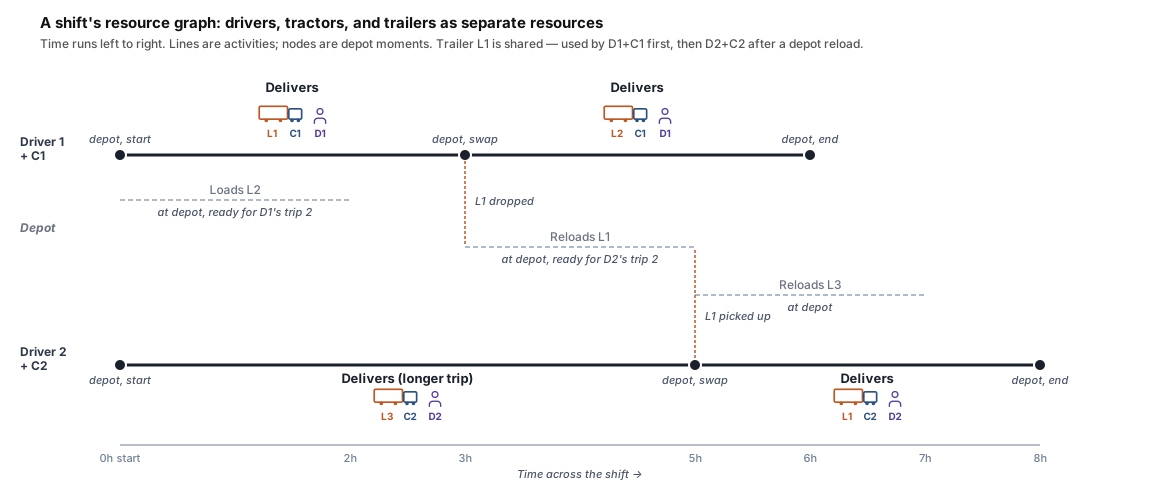
A shift’s resource graph. Two drivers, two tractors, three trailers — trailer L1 is used by both drivers, separated by a depot reload. Time runs left to right; lines between depot moments are activities.
Technical Detail
Vehicles
A vehicle in Optrak is one of three types: a truck (a single powered unit with carrying capacity), a tractor (a powered unit without significant carrying capacity, designed to pull a trailer), or a trailer (carrying capacity without a powered unit). Trucks and trailers can carry layouts — multi-temperature with moveable bulkheads, multi-compartment bulk for tankers — that determine what loading rules apply (see load optimisation).
Vehicles have capacity, cost information, and availability. Cost information allows spot-hire vehicles to be modelled alongside in-house ones: the optimiser will reach for spot-hire when in-house capacity is exhausted and the cost is justified by the alternative.
Drivers
Drivers are separate from vehicles. For many operations a driver is paired with a specific truck or tractor as the default, but the pairing isn’t built into the data model — it’s a configuration choice. Drivers have their own availability windows, shift rules, and break rules, plus qualifications and training that act as compatibility constraints (ADR certification for dangerous goods, terminal training for petroleum 3PLs, client-specific training where one paperwork set isn’t valid for another).
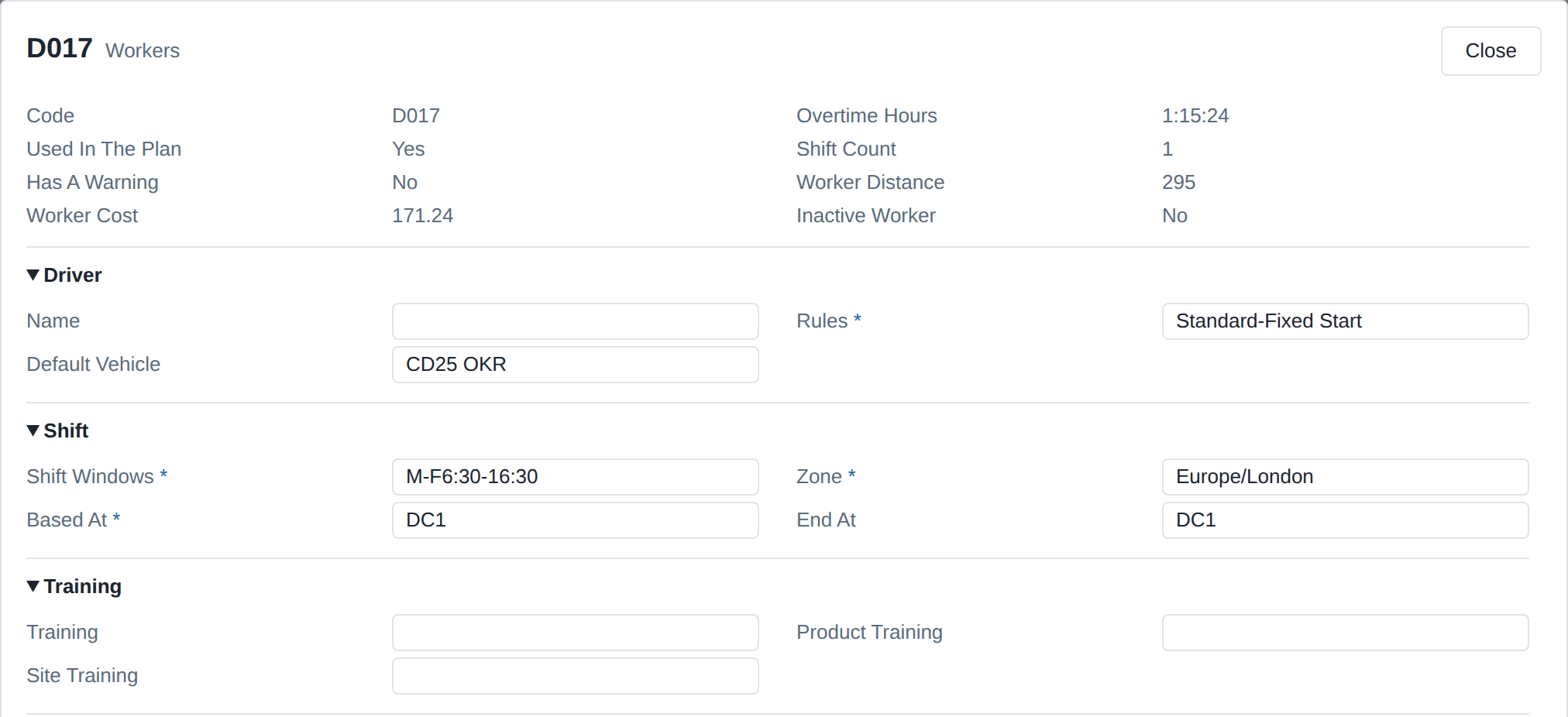
A driver’s record. The default vehicle is a setting, not a fixed pairing, and the training fields are what decide which products and sites the driver can be given.
Equipment
Equipment is the third resource type, and can occur in three places. It can be an attribute of a vehicle — a tail-lift, a refrigeration unit, a built-in pump on a tanker. It can be an attribute of a site — a loading bay, an on-site forklift, a charger. Or it can be independently added to a vehicle for a specific route — a Moffett truck-mounted forklift loaded for a route that needs it, a portable pallet pump for a site that doesn’t have its own. Route-specific equipment is itself a scarce resource that has to be scheduled.
The optimiser respects equipment requirements when matching vehicles to orders: an order to a site without a loading bay that requires a tail-lift can only be placed on a vehicle that has one, or that has a Moffett added for the trip.
Keeping Track of What Is Committed Where
Underneath all of this, Optrak keeps a record of which vehicle, driver and piece of equipment is committed to which trip at what time. That is what makes the rest of it safe, across every kind of combination Optrak allows: a rigid used by one driver in the morning and another in the afternoon, a tractor that picks up trailer A in the morning and trailer B at lunch, a trailer that gets handed from one tractor to another at a relay point.
This is what enables tractor-trailer reassignment within a shift — switching a tractor from a full-length highway trailer to a shorter urban trailer for afternoon city deliveries, for example. It’s also what enforces the constraint that one shift’s use of a vehicle must finish (with reload, refuelling, and vehicle checks) before the next shift can start.
Worked Example: Petroleum 3PL
Pigden 2013 §3.5 records this case as Company R: a third-party logistics provider delivering petroleum products on behalf of several clients, each running their own oil terminals.
Company R’s fleet is mixed in origin — some tractors, trailers, and drivers were transferred when it took over each contract, others were bought and recruited separately. Drivers carry terminal-specific training (one day per terminal), product-specific training covering spillage and emergency procedures, and client-specific training because each client has its own paperwork and rules. Vehicle liveries reflect their origin: a tractor in client A’s livery cannot be combined with a trailer in client B’s livery (the marketing message is incoherent), Company R’s neutral livery can pair with any client’s vehicles, and some customer sites further require trailers in matching client livery.
Compatibility rules apply at four levels: product/trailer (some products only on some trailers), tractor/trailer (equipment mismatches between units), tractor/trailer/product (some combinations work for some products and not others), and tractor/trailer/customer (some combinations work at some sites because of gravity offload or pumping arrangements).
Software that rolls driver, tractor and trailer into one unit can’t describe any of this. Optrak keeps each of them separate, with its own detail, and the optimiser keeps to all four sets of rules as it builds rounds and as it considers changing them.
How This Compares
Several routing products have real depth in scheduling — driver skills, drivers’ hours and tachograph links are well covered, and drivers and vehicles are held separately in the data. What differs is what the optimiser can do with that separation. A common limit is that the tractor and trailer are paired at the start of the shift and stay paired. Optrak has specialist methods that treat tractor and trailer as things it can schedule independently through the day, with the record of what is committed where keeping the combinations clash-free.
Where the driver and vehicle stay together and trailers don’t get swapped, the difference doesn’t arise — Pigden 2013 §3.6 says plainly that treating a trip as one resource is valid for many operations, probably most. It tells where it tells: hauliers whose fleets came from several different places, town distribution that changes trailer type during the day, and any operation where what driver, tractor and trailer can do together isn’t reducible to a single combination.
Frequently Asked Questions
Can a tractor be paired with different trailers within the same shift?
Yes. Optrak has specialist methods for changing trailers part-way through a shift — sending a tractor out with a full-length trailer in the morning, say, and putting it on a shorter one for town deliveries in the afternoon. Optrak keeps track of what is committed where, so the change works across shift boundaries and across drivers without clashing.
How does Optrak handle driver shifts and breaks?
Drivers are modelled as resources separate from vehicles, with their own availability, shift rules, and break rules. Shift rules can include start and end times, maximum driving hours, mandatory breaks, and longer rest periods. Driver-specific qualifications (e.g. ADR certification, terminal training, client training) act as compatibility constraints that the optimiser respects when assigning drivers to trips.
Can a single vehicle be used by multiple drivers in a day?
Yes. The resource scheduling graph supports vehicles being used across multiple shifts by different drivers — including the constraint that one shift must finish (with reload time, refuelling, and vehicle checks) before the next can start. This handles double-shifting operations where the same vehicle runs a day shift and a night shift with different drivers.
What kinds of equipment can be modelled?
Equipment can be an attribute of a vehicle (e.g. tail-lift, refrigeration unit), an attribute of a site (e.g. loading bays, on-site forklift), or independently added to a vehicle for a specific route (e.g. a Moffett truck-mounted forklift, a pallet pump). The optimiser respects equipment requirements when matching vehicles to orders, and treats route-specific equipment as a scarce resource that has to be scheduled.
Does Optrak handle driver’s mates or second crew?
Yes. A second crew member is modelled as an additional resource with its own cost. The optimiser can decide whether the additional cost is worth the operational benefit — faster unloading at sites with multiple drops, faster return to depot for a second load, security in high-crime areas, or specific health-and-safety requirements like trapdoor cellar deliveries.
How are spot-hire vehicles modelled?
Spot-hire vehicles carry their own cost information, typically higher than in-house vehicles. The optimiser will use them when in-house capacity is exhausted and the cost of spot-hire is justified by the alternative (missed deliveries, late deliveries, or splitting an order across days). Strategic modelling can use spot-hire cost data to evaluate whether to expand the in-house fleet.
Related
Technical Summary
Optrak’s resource model represents fleet operations through three first-class entity types — vehicles, drivers, and equipment — with vehicles further divided into trucks (powered unit + carrying capacity), tractors (powered unit without significant carrying capacity), and trailers (carrying capacity without powered unit). Vehicle layouts include multi-temperature with moveable bulkheads and multi-compartment bulk. Vehicles carry capacity, cost (supporting spot-hire modelling), and availability. Drivers are separate entities with shift rules, break rules, availability, and training/qualification constraints used as compatibility rules; driver’s mates are modelled as additional resources with their own cost. Equipment can be a vehicle attribute (tail-lift), a site attribute (loading bay), or a route-specific addition (Moffett, pallet pump). A resource scheduling graph supports cross-shift vehicle use by different drivers, tractor-trailer combination management, and tractor-trailer reassignment within a single shift — assigning different trailer types (e.g. full-length highway and shorter urban) to the same tractor at different points in the day. The architectural distinction from the standard VRP single-resource formulation is that all resources are independently schedulable; this is what makes the five resource-distinguishing cases identified in Pigden 2013 §3 — driver’s mates, second drivers, double-shifting, driver-area allocation, and complex tractor/trailer/driver compatibility (Company R) — tractable inside a single optimisation loop. Reassigning a tractor to a different trailer within a shift is a capability many routing optimisers don’t act on, even when they model the resources separately.
Reference: Pigden, T. (2013). “Missing from the Model: Orders, Drivers, Tractors and Trailers and Non-Linear Loading.” GECCO ‘13 Companion, 1079–1084. DOI: 10.1145/2464576.2482686.
See Optrak on Your Own Routes
Book a demo and we'll model your fleet, depots and constraints — and show the savings on real data.