data model
Load Optimisation
Load optimisation is working out whether a set of orders will actually go on a vehicle — fit in the space, sit safely, stay legal, and come off in the right sequence at each drop. Optrak has three loaders for it: one for goods that stack, one for multi-temperature trailers with moveable bulkheads, and one for tankers with compartments. All three run while the round is being built, on every change the optimiser tries, so a load that won’t go on never reaches the plan.
Last updated: 2026-08-11
Key Capabilities
- 3D loader: what can stack on what, which way up things go, keeping the load stable, and the weight over each axle worked out again after every drop
- 2D loader: floor plans for the containers standing on the vehicle floor, in multi-temperature trailers where the bulkheads move
- Bulk loader: tankers with compartments, including which products can follow which and what cleaning that needs
- The load is checked while the round is being built, not in a separate pass afterwards
- A loading diagram is produced for every planned trip
Optrak checks whether a planned load will really go on the vehicle — whether that means fitting it on the floor, stacking it, or filling the compartments of a tanker.
Why a Simple Capacity Model Fails
Most routing software describes what a vehicle can take as one or two numbers: a weight, and perhaps a volume. For a vehicle carrying one kind of thing — pallets, say — that is a fair enough approximation. For a vehicle carrying a mix of pallets and roll-cages, or divided into compartments for different temperatures, or holding several liquids with cleaning rules between them, it simply doesn’t work.
The cost turns up later, in the warehouse and on the road. If the planner spots it, they spend the time — often hours — working out by hand what will actually go on. If they don’t, the night crew find out: staff repack by hand, another vehicle goes out to take the overflow, or orders are left behind. On a tanker, the wrong sequence of products risks contaminating a compartment. On collections, the goods simply won’t go on the vehicle at all.
None of these failures are visible to software that that doesn’t understand the real world loading problem. A round may look fine based solely on weight and volume, but have disastrous consequences when executed.
Pigden 2013 sets out what is missing from the model — the containers goods travel in, compartments, stacking rules, awkward shapes — all the things that stop capacity being a simple sum and make it depend on what is being carried and how. Optrak’s three loaders capture these details, and check every time the optimiser considers a change, or a planner makes an edit, rather than once the round is finished.
The Three Loaders
Optrak has three loaders, and uses whichever suits the vehicle. The optimiser calls it on every change it considers.
All three know what order things come off in. Load plans are practical ones: for example, on a vehicle loaded through the back, what goes on last comes off first, unless you have said the crew may shift things about on board.
3D Loader — Goods That Stack
The 3D loader handles mixed goods that stack: cartons on pallets, pallets of different sizes in a trailer, awkward loads in a container. It adheres to rule about which way up things must go and which way round they sit in the trailer, what can stack on what, and the requirement that everything rests on something solid rather than floating in mid-air. It calculates a sensible balance point, and works out the weight over each axle again as the load changes at each drop.
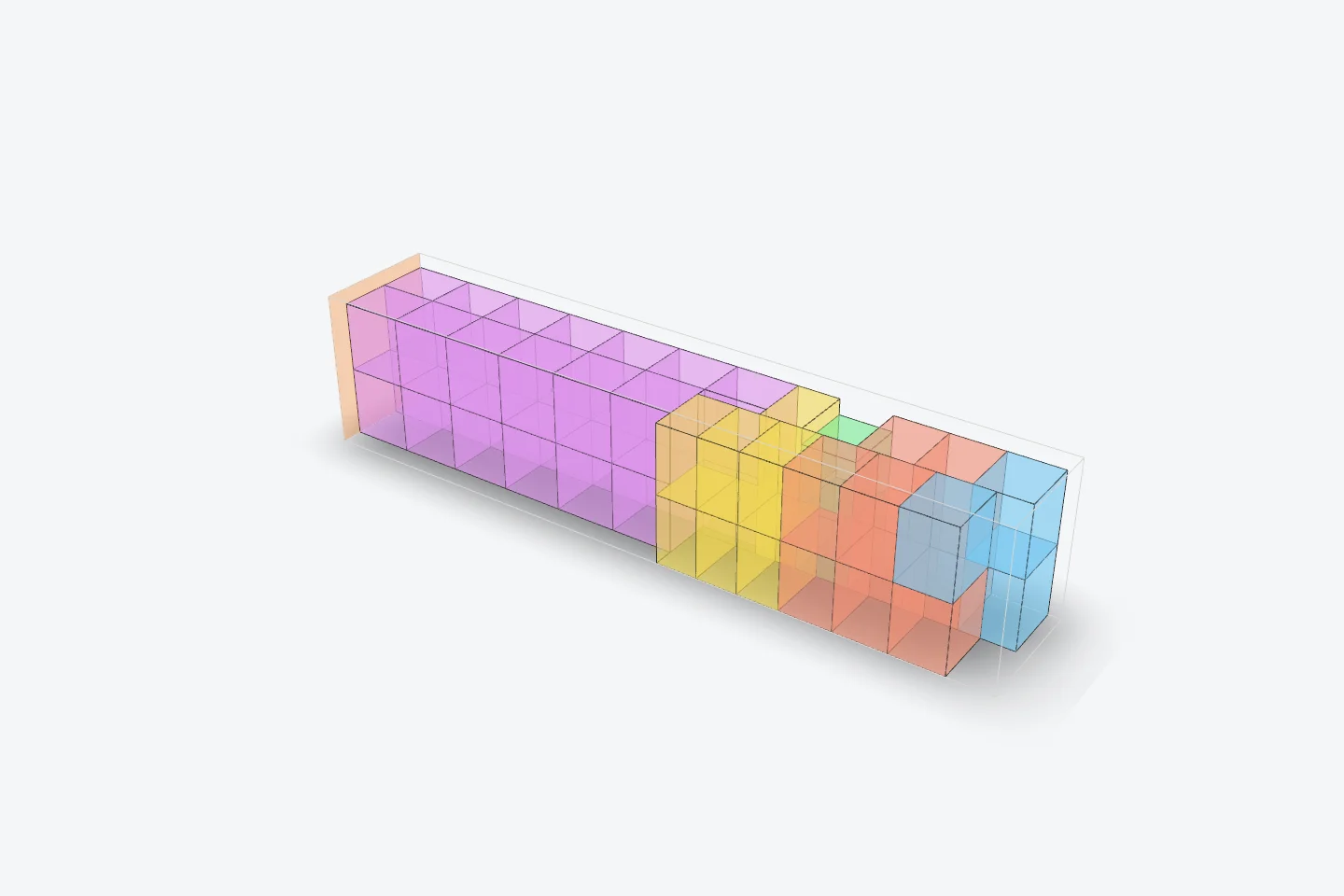
Drag to rotate, scroll to zoom. (Placeholder model — to be replaced with a 3D loader export showing mixed-pallet stacking and axle weight indicators.)
2D Loader — Multi-Temperature Trailers With Moveable Bulkheads
The 2D loader is for vehicles where stacking is limited — typically multi-temperature trailers with bulkheads that move, where the job is fitting pallets and roll-cages alongside each other on the floor. It works to the compartments as set, which products are allowed in which, and keeping the weight even side to side.
Space can be set aside for the equipment used to move goods around, and for the room people need to work.
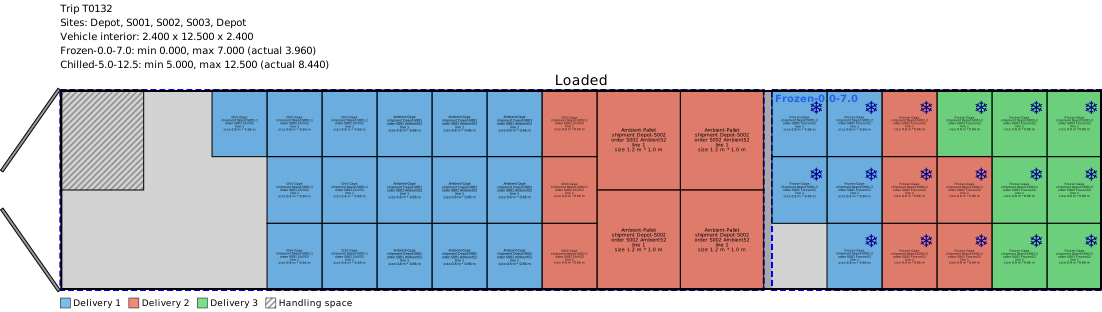
Dual-compartment trailer
The diagram above shows a two-compartment trailer with goods for three sites. A loading rule set for this operation keeps a pallet-sized space clear by the back door. Delivery 1 (blue) is roll-cages: the chilled and ambient cages can come off first, after which Delivery 2’s chilled and ambient cages can be moved along to open up a way through to Delivery 1’s frozen goods.
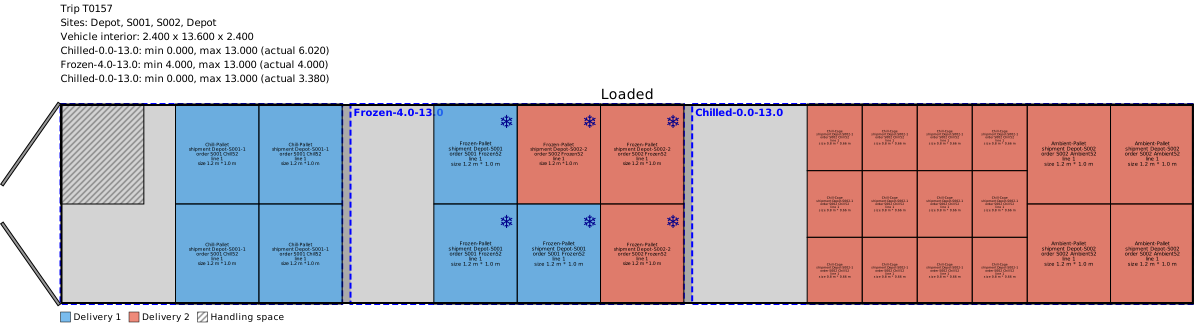
Tri-compartment trailer
The three-compartment trailer makes room for a bigger Delivery 2, with the chilled and ambient goods kept in the compartment furthest forward.
Bulk Loader — Petroleum, Chemicals, Food-Grade Liquids, Powders
The bulk loader handles tankers whose compartments each carry a single product. A compartment holds traces of whatever was in it last, so there is a risk of contaminating what goes in next. In practice that is dealt with by cleaning of some kind, and different pairings of one product following another need different work, at different cost.
Optrak handles this directly: you set out every transition and what it costs. In trades with a great many products — lubricants, for instance — the transitions can be set by family of product rather than for every individual product code.

The cleaning rules for a lubricants depot. Each change of product names the clean it needs, and the clean carries its own cost and time.
You can also fix a compartment to one product permanently — a dedicated compartment for AdBlue (DEF), say. And compartments may be metered or unmetered.
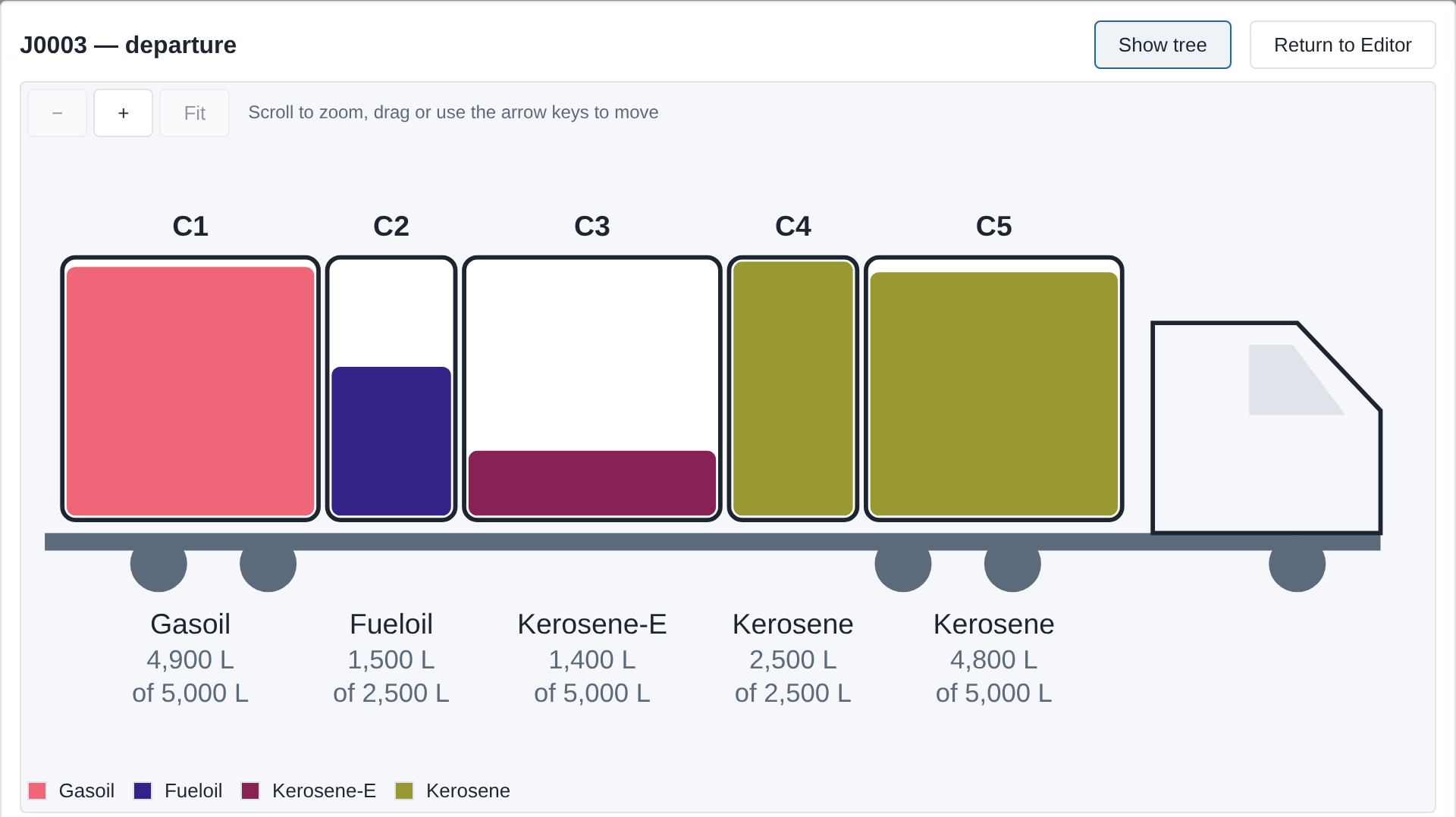
Bulk load view. Compartments run front to back with the cab on the right, and the area shown corresponds directly to volume. Each compartment carries one product; one product can fill more than one compartment, as the kerosene does here.
There is a further constraint around pumps. A pump and its hoses always hold some of the last product through them, and a vehicle may have more than one. Optrak can sequence the deliveries and the use of the pumps so that contamination can’t happen, or, where the facility exists, flush to a waste tank.
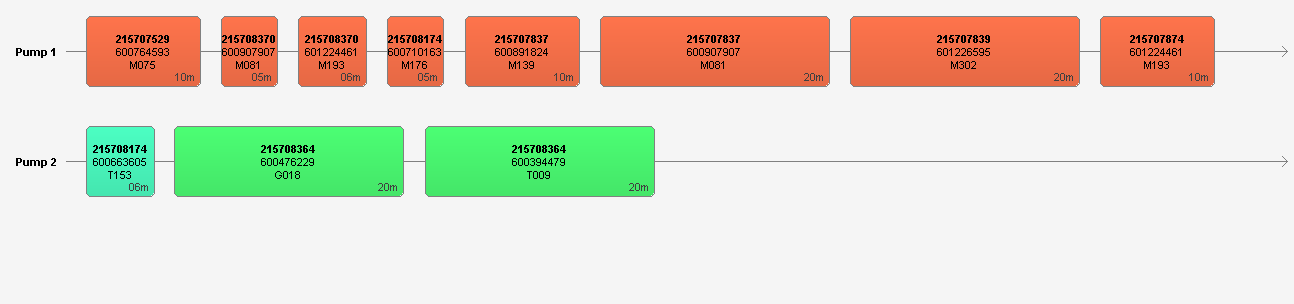
Pump sequencing. Here the contamination rules — and the colours — go by family of product rather than by individual product code. Within a family a small amount of residue is acceptable, and on Pump 2 the transition shown is permitted too.
Pump rules are absolute: they fix what sequence the deliveries can be made in.
Other tanker arrangements, such as discharge by gravity, are handled elsewhere — through which vehicles can serve which sites, and how long loading and unloading takes.
Common to All Three
The load is worked out again at the end of every visit, not just when the vehicle is loaded at the depot. A round that is fine leaving the depot but leaves the trailer out of balance after the second drop is rejected while the plan is being built, rather than discovered at the third stop. Loading diagrams come out of the software for every planned trip, so the warehouse team has the picking and loading sequence straight from the plan.
How Loading and Routing Work Together
In Optrak, loading is not a separate step that runs after the round has been planned — it happens as part of the same search. Every change the optimiser considers — adding a stop, changing the order of calls, swapping vehicles, moving goods from one vehicle to another — triggers the relevant loading check before that change can be accepted.
That is different from the more common arrangement, where the round is planned first and a load-building step then tries to fit the load to it. The two behave very differently on the days when loading is the thing that decides what is possible.
How This Compares
Several routing and transport products offer 3D load-building. The serious ones are standalone load-builders, some with published benchmarks and links into routing products and ERP systems. Others tie palletisation and 3D truck loading into the routing decisions, and there are petroleum-specialist tools that handle compartmented tankers with contamination rules.
Optrak differs in two specific places. First, in when the checking happens: the load is checked while the round is being built, on every change considered. Standalone load-builders are judged on loading alone, which fits an arrangement where the round is planned first and loaded second. Second, in what is covered: the 2D loader for multi-temperature compartments with moveable bulkheads handles a kind of operation that pure 3D packing engines aren’t built for.
Where loading is rarely the thing that decides what is possible, the difference matters less. Where loading is tight, varied or complicated, checking as you go produces workable plans without the round of planner rework that comes from doing the two jobs one after the other.
Technical Details
Loading depends heavily on knowing the goods properly, and often on the containers they travel in.
Dimensions can either come from the product data or, in some cases, be attached to the order lines themselves — for example, where you are carrying somebody else’s goods under their own codes.
For the 2D and 3D loaders, loose items can first be gathered into containers as shipments, and the loader then works with the containers rather than with each item.
Product data includes what can be stacked on what.
For bulk products, the table of transitions carries costs: like following like is free, and other transitions get progressively more expensive. What was last in each compartment is carried over from one plan to the next.
The 2D and 3D loaders use fast methods that take a good answer rather than proving the best one — they work through the load making sensible choices with a limited amount of going back on themselves. That is unavoidable, given the work has to be done at every load and unload, on every change the optimiser considers.
Frequently Asked Questions
Why is loading part of route planning rather than a separate job?
Because the two decisions depend on each other. If a round calls at customer A before customer B, then B’s goods have to be loaded behind A’s — which constrains how the vehicle can be packed. A round that puts too much weight over one axle isn’t a round you can run, however good it looks on a map. Do the two jobs separately and you get plans that look right from each side and don’t work when you put them together.
Can Optrak produce a plan whose load doesn’t fit?
Not against the loading rules as you have set them. Every change the optimiser considers triggers the relevant loading check before it can be accepted. A planner working by hand in the screen can build a round that has no workable load — but it is flagged plainly as such.
Does it handle temperature-controlled compartments?
Yes. The 2D loader covers multi-temperature trailers with moveable bulkheads — compartments that can be set differently for each trip, so a chilled section can be made bigger for a run with little frozen on it. Products are put in compartments they are allowed to travel in, and the optimiser keeps to those assignments as well as to the space itself.
What about bulk liquid tankers?
The bulk loader covers tankers with compartments. For any pairing of one product following another, you set what that transition needs: a flush, a full clean, or that it isn’t allowed at all. The optimiser keeps to that, along with metering, part loads, and what the cleaning costs between trips.
How are stacking rules set?
On the product: how high it can be stacked, whether something heavier can go on top of it, whether it can be stacked at all, and rules at pallet level for goods that can’t be. The 3D loader works to those when it builds the load.
Does the warehouse get a loading diagram?
Yes — for every planned trip, showing where each pallet or cage goes in the vehicle and the sequence to load them in. That is what connects a good plan to what actually happens on the loading bay.
Related
Technical Summary
Optrak handles three loading families. The 3D loader covers stackable mixed cargo with orientation rules, stacking and support compatibility, centre-of-gravity targets, and axle weight distribution recalculated between stops. The 2D loader covers floor-plan loading for intermediate containers in multi-temperature trailers with reconfigurable moveable bulkheads — the non-linear capacity case identified as Company B in Pigden (2013, §4.1), where lateral compartment geometry makes any frozen product occupy at least 2.2 pallet spaces. The bulk multi-compartment loader covers tankers with product-pair compatibility encoded as a configurable cleaning matrix, with compartment metering and partial loads supported. All three are invoked inside the optimisation loop on every accepted move, so the routing optimiser cannot output a route whose load violates configured constraints; load feasibility is recalculated at every visit, not only at depot loading. Loading diagrams are produced for every planned trip. The architectural distinction from sequential route-then-load pipelines — a standalone load-builder running after routing — is that load infeasibility cannot survive into the output. The coverage distinction from pure 3D bin-packers is the 2D loader for compartments that reconfigure between trips.
Reference: Pigden, T. (2013). “Missing from the Model: Orders, Drivers, Tractors and Trailers and Non-Linear Loading.” GECCO ‘13 Companion, 1079–1084. DOI: 10.1145/2464576.2482686.
See Optrak on Your Own Routes
Book a demo and we'll model your fleet, depots and constraints — and show the savings on real data.