data model
Sites
A site in Optrak is any place a vehicle goes as part of a plan — a depot, a customer, a public charger, a rest stop, somewhere to park overnight. Each carries its own opening times, what vehicles can get in, what equipment is there, how long loading and unloading takes, what training the crew need, and — for depots — the work that happens at the start and end of a shift. All of them are part of the same plan, rather than being left to a separate exercise.
Last updated: 2026-08-11
Key Capabilities
- Four kinds of place the optimiser can plan around: depot, customer site, public charging point, rest stop
- Depots carry the work that happens in them: overnight pre-loading, shift-start vehicle and load checks, end-of-shift paperwork, and linked parking sites
- Access rules per site: maximum weight, maximum length, width and height, named rules such as 'no artics', banned products, and training the crew must hold
- Loading and unloading times per site: a fixed part plus an amount that varies with the units, weight or volume being handled
- Site boundaries drawn on a map, several opening windows a day, each site in its own time zone, and equipment lists including chargers and which side a vehicle can be worked from
A site in Optrak is any place a vehicle goes as part of a plan — a depot, a customer, a public charger, somewhere to stop overnight. Each has its own opening hours, its own rules about what can get in, its own equipment, and — for depots — the work that happens at the start and end of a shift. The optimiser plans around all of it.
Why “A Point on a Map” Isn’t Enough
Routing software has to know where the customers are. The least it can hold is a position on the map, an opening window, and how long the drop takes. That is enough for a textbook example. It is not enough for a real fleet.
Real fleets visit places that aren’t customers. Vehicles start and end shifts at depots that have their own work patterns: pre-loading overnight, vehicle checks at shift start, post-shift debriefs that take real time. EV operations stop at public chargers with their own opening hours and tariffs. Long-distance work overnights at rest stops that have to be safe and may have to be booked. None of these locations are “customers”, and a model that only knows about customers either ignores them or pushes them to a separate scheduling step.
Real fleets also visit customers that have different characteristics. One site is a tight urban delivery with a 7.5-tonne weight limit. Another bans peanut products. Another requires its drivers to hold a current site induction. Another opens at 6am for HGV delivery and not before. These constraints aren’t edge cases; they’re what makes one delivery slot different from another.
When the model treats sites identically, the planner becomes the model. They keep a spreadsheet of which vehicles can go where, which drivers are inducted at which sites, which depots can pre-load overnight. The plan is then their reconciliation between what the optimiser produced and what the fleet can actually do. That’s where plan rework comes from.
Site Types
Optrak models four site types. All four are plannable — the optimiser can route a vehicle through any combination, not just the standard depot→customer→depot pattern.
Depots are sites where vehicles start and end shifts and where loading and unloading happens. They carry the full shift-mechanics model (see below) and can be linked to associated parking sites for vehicles that overnight elsewhere.
Customer sites are the standard delivery and collection points, with opening windows, load/unload rates, vehicle constraints, and (where relevant) banned products, required worker training, geofence, and a preferred container type (e.g. pallet or roll-cage deliveries only).
Public charge sites carry power output, cost per kWh, vehicle compatibility, and a charge-until-reset flag for chargers that have to fully complete a session before another vehicle can use them. They’re plannable the same way a customer is — see in-route charging for how they’re inserted.
Rest stops are overnight parking for sleeper-cab vehicles - or hotel facilities. They carry cost, security level, and a list of facilities — showers, food, fuel. Multi-day plans place them as overnight breaks within a tour.
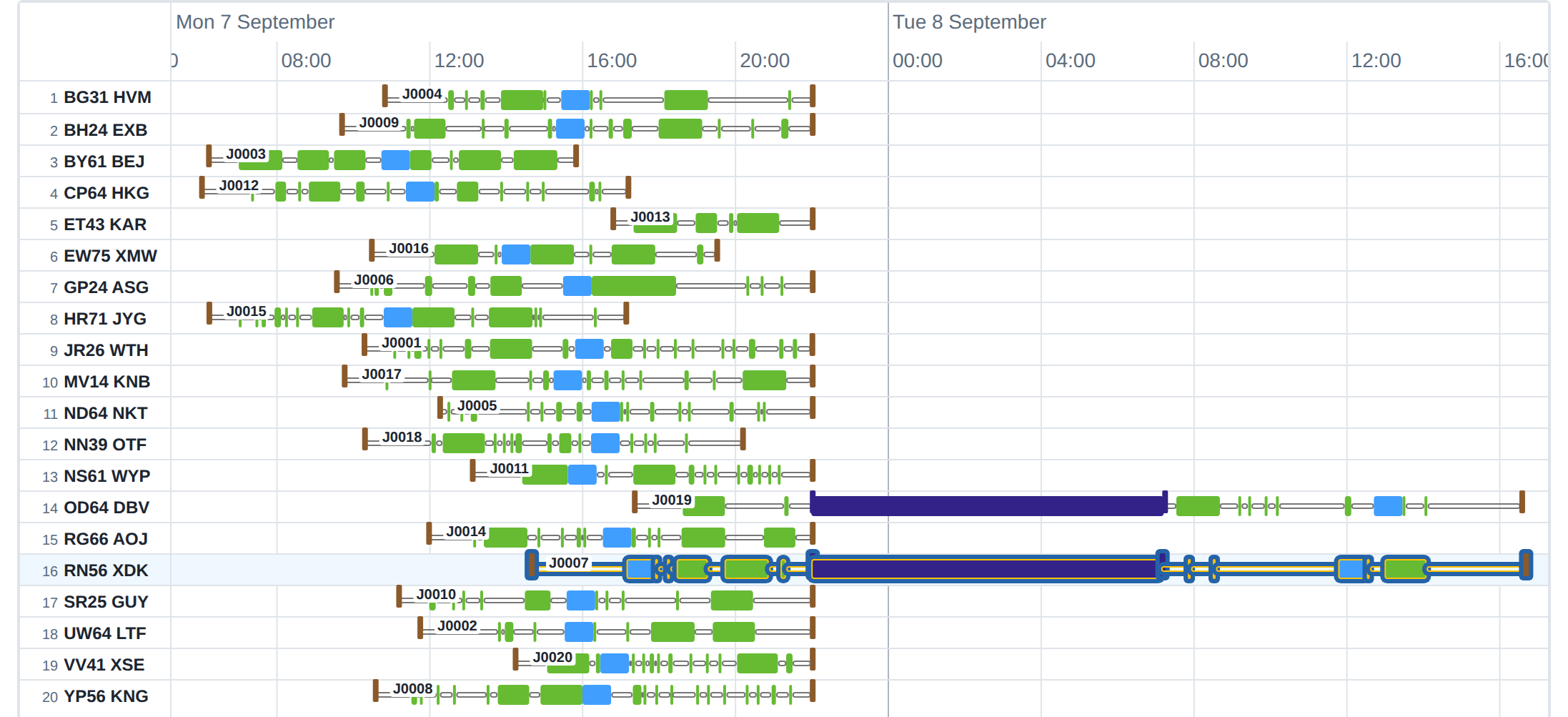
A two-day plan. Two of the twenty journeys stop overnight at a rest stop and finish their deliveries the next day.
Charging is a cross-cutting concern. Depots are the most-frequent charging location, but charging can happen at rest stops and even customers.
Depot Mechanics
Available shift time is usually the critical resource in producing a plan. So accurately modelling time spent at the depot is crucial.
Three durations apply at shift start, scheduled against the driver: vehicle check, load check, and admin time for paperwork. Three more apply at shift end: vehicle return check, debrief, and (where applicable) supervised unloading.
If the depot pre-loads vehicles overnight, the loading time is allocated against the vehicle without being charged to the driver’s shift. Useful for early-departure trips where the driver arrives to a loaded vehicle. The same applies after shift: depot staff can unload a returned vehicle ready for the next round, on vehicle time, off driver time. Where the depot does both, vehicles can stay between shifts being unloaded and reloaded by yard staff without that time costing any driver hours - conversely, if the driver needs to be involved, it is counted against the driver.
A depot can be open to vehicles arriving and leaving at one set of times, and open for loading at another — they’re not always the same - for example, there may be loading staff available for second trips up until 12:00 not later, but drivers may always get back in the afternoon.
The result is that the planned shift duration is realistic. A driver isn’t credited with a 13-hour day when 90 minutes of it is depot admin and pre-trip checks. Shift legality, paid hours, and whether the round can be done at all are all worked out against the same clock.
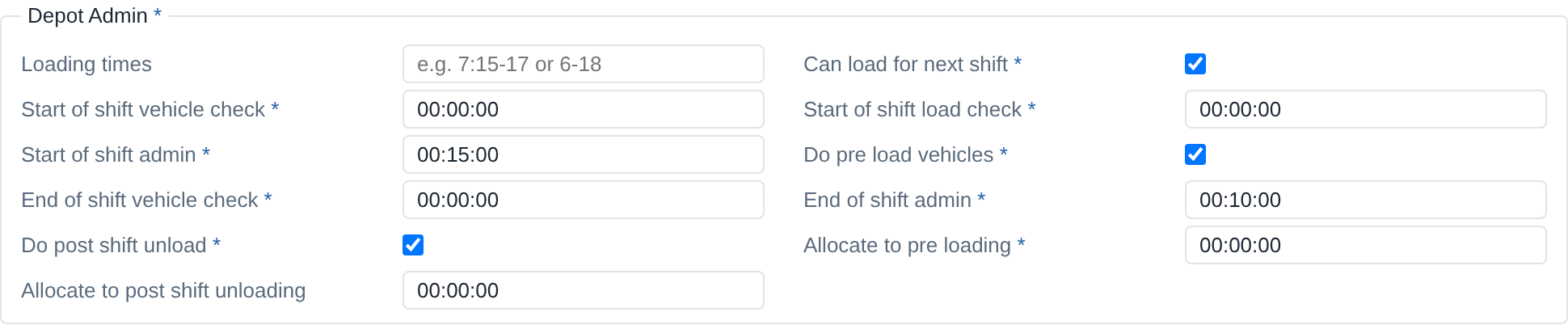
A depot’s shift routine as it is set up in Optrak. This depot pre-loads vehicles and unloads them after the shift, so that work is done on vehicle time rather than the driver’s.
Site-Vehicle Compatibility
Each site can declare what kinds of vehicle can visit it.
A compatibility code pointing at named rules — no artics, no double-deck trailers, box-only, tail-lift required. These codes can also carry a number, for the cases where a plain yes or no won’t do.
A maximum gross weight for the site, separate from the vehicle’s own legal limit.
Maximum dimensions — length, width, height — for the vehicle on arrival. Each is optional and independent.
These constraints are checked on every optimiser move that would assign a vehicle to a site. Plans that violate them aren’t generated.
Two further constraints apply to people and products:
- Worker training required — a code on the site that the driver or crew has to meet: site inductions (at refineries, for instance), dangerous goods certification, or security vetting for airside deliveries
- Products banned on site — a compatibility code on the site that the products can’t trip. Peanut-free food sites, alcohol-free prison sites.
Both are treated the same way as vehicle compatibility: hard constraints checked during route construction.
Worked Example: A Two-Shift Depot
A regional distribution depot runs two driver shifts off the same vehicles. Night staff pre-load Vehicle 14 between 11pm and 2am for an early start. Driver A arrives at 3:30am, does vehicle and load checks (15 minutes combined), picks up paperwork (5 minutes), departs by 3:50. Returns at 11:30. Yard team unloads remaining stock and reloads for the afternoon while Driver A debriefs and clocks off. Driver B picks up Vehicle 14 at 12:30, does shift-start checks, departs at 12:50, runs the afternoon round, returns at 7:30, debriefs and clocks off.
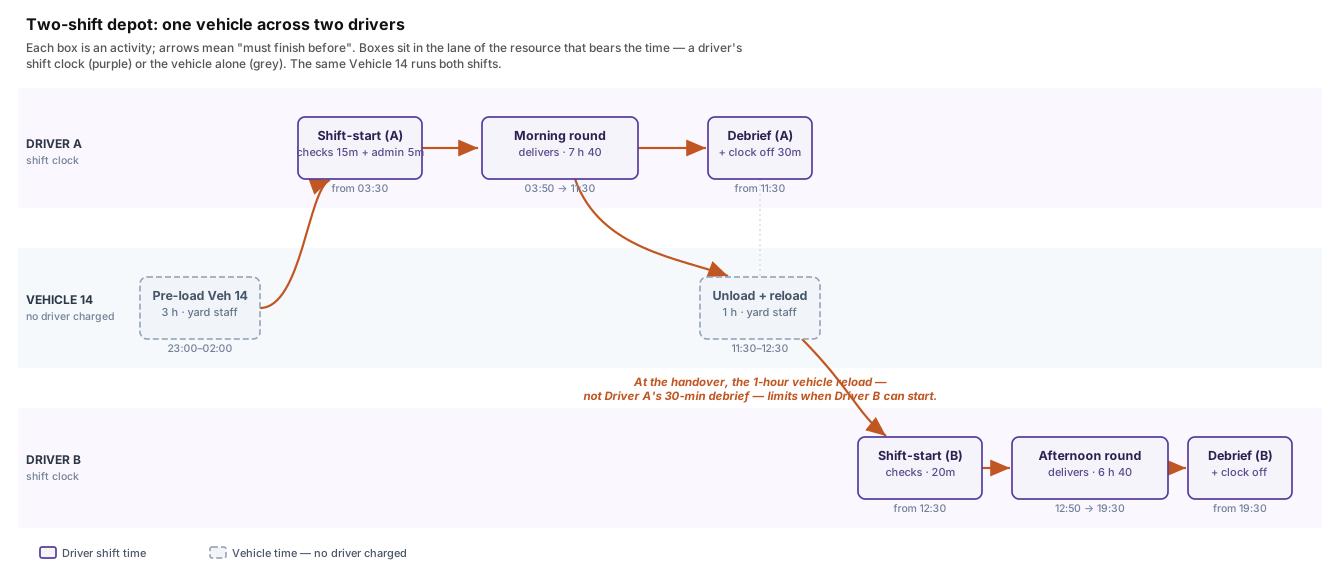
One vehicle across two driver shifts. Pre-loading and the inter-shift reload (grey) use the vehicle but charge no driver; shift-start checks, the rounds, and debriefs (purple) are charged to each driver’s shift clock. The hour-long reload — not Driver A’s debrief — is what limits when Driver B can start.
Two things have to be modelled correctly. First, the overnight pre-load doesn’t charge against any driver — it’s vehicle time, scheduled by the depot. Second, the inter-shift reload uses the vehicle but neither driver; Driver A’s debrief and Driver B’s check don’t overlap.
How This Compares
All major route optimisation products represent depots and customer sites; the question is how much of the operation lives inside the model versus around it. Some tools have very developed depot modelling, with explicit loading and unloading work and shift-handover support; others are strong on UK city-centre vehicle access constraints — bridge weights, lane widths, time-banded restrictions — or model EV charging locations as part of a separate EV planner.
What sets Optrak apart is holding all of it in one place. The same description of a site covers a depot with all its shift work, a public charger with its tariff, and a rest stop with its facilities, as well as the access rules, equipment and loading times on the customer side. Planning a round that includes an overnight stop and a public charger doesn’t mean changing tool, exporting anything, or running a separate exercise.
For operations that are mostly depot and customers with straightforward shifts, that breadth matters less. For multi-shift depots, for fleets going electric, or for any operation that routes through places that aren’t customers, it is what stops the planner being the one who has to reconcile it all.
Technical Detail
Site is the base, with four subtypes. Common fields cover location (point and
optional polygon geofence), opening time windows (encoded, multiple per day), per-site time
zone, an isArrivalConstraint flag (whether the window applies to arrival only or to the
whole visit), fixed dwell duration, load and unload rate references, vehicle-requirements
record, static equipment, worker training compatibility, banned-products
compatibility, vehicle-handling sides and handling space, and arbitrary JSON extensions for
custom fields.
Time Windows
Time window support allows multiple windows per day, different windows by day-of-week
and explicit closed days. For large area planning, each site carries its own ZoneId allowing
time windows to be expressed in the local timezone.
Load and Unload Rates
Each site references rates separately for loading and unloading. A LoadingCategory is matched to product, allowing different rates depending on handling - for example loose boxes, pallets or bulk pump-off. The rates themselves can be calculated as a fixed component plus variable by unit, weight or volume. Sometimes the rate depends on the vehicle (for example on-board pumps) in which case this can be set to override the site rates.
Equipment and Handling
Sites can have equipment of their own — handling equipment or facilities such as a loading dock or fork-lifts. Handling also covers whether a vehicle can be loaded and unloaded from the side (and which side) or only through the back doors. That feeds into the 2D and 3D loaders, which decide where the goods go on the vehicle.
Equipment also includes chargers. Each electric charger defines power, cost per kWh, and vehicle compatibility.
Frequently Asked Questions
What kinds of site does Optrak model?
Four: depots, customer sites, public charging sites, and rest stops. All four are plannable — the optimiser can route a vehicle through any combination, not just depot-to-customer-to-depot. A vehicle can leave a depot, deliver to several customers, stop at a public charger, deliver to more, overnight at a rest stop, and return to a different depot the next day.
What does Optrak model about depots that other routing software doesn’t?
The work that happens at the depot itself. Each depot carries shift-start vehicle check time, load check time, and admin time before the driver leaves; end-of-shift vehicle return, unloading, and debrief; overnight pre-loading by depot staff (which costs vehicle time but not driver time); and post-shift unloading. These show up in the planned shift duration, not as inputs to a separate scheduling system. Depots can also link to associated parking sites for vehicles that don’t return to base overnight.
Are public EV chargers and rest stops plannable?
Yes, both. Public charge sites carry power, cost per kWh, vehicle compatibility, and opening hours, plus a charge-until-reset flag for chargers that need to fully complete a session before another vehicle can use them. Rest stops carry cost, a security level, and a list of facilities (showers, food, fuel). The optimiser inserts them into a route the same way it inserts any other visit — they’re part of the same plan, not a separate scenario.
How does Optrak handle sites that can’t accept large vehicles?
Each site can carry vehicle compatibility constraints: a code that references rules like ‘no artics’ or ‘tail-lift required’, a maximum gross weight, and maximum length, width, and height. Urban delivery sites with low bridges, weight-restricted lanes, or tight access are routine. The optimiser checks site-vehicle compatibility on every move that would assign a vehicle to a site.
Are time windows independent of opening hours?
Yes. Each site carries opening time windows (multiple per day allowed) and a per-site time zone. Each order then carries its own earliest/latest times that are independent of site hours, so booked deliveries are routine. A flag on the site says whether the window applies only to arrival or to the whole visit (arrival to departure).
What about load and unload speeds?
Each site has its own loading and unloading rates, set by category of goods. A rate has a fixed part plus amounts that vary with the number of units, the weight and the volume, so how long a stop takes depends on what is being dropped. A particular vehicle can override the site’s rates where, for instance, its own tail-lift makes it slower or faster than usual.
Related
Technical Summary
Optrak’s site model is a sealed trait with four concrete subtypes — depot, customer site,
public charge site, rest stop — sharing common fields for location, polygon geofence,
encoded time windows, time zone, an arrival-vs-full-visit flag,
load and unload rate references, vehicle-requirements record, static equipment chunk,
vehicle handling sides and space, worker training and banned-products compatibility codes,
and arbitrary JSON extensions. Time windows support multiple windows per day with
day-of-week variation. Load rate records are maps from loading category to a
fixed-plus-per-unit/per-weight/per-volume rate function, so dwell times scale with what’s
being moved. Vehicle compatibility carries a named code, a maximum gross weight, and a
maximum length/width/height triple, all optional and independent. Depots additionally carry
a DepotAdmin record covering overnight pre-loading on the vehicle, shift-start and
shift-end checks and admin allocated to the driver, post-shift unload by depot staff,
loading time windows distinct from open hours, and associated parking sites. Public charge
sites carry power, cost per kWh, vehicle compatibility, and a charge-until-reset flag, and
are plannable rather than out-of-band. The architectural distinction from
depot-and-customer-only site models is that all the locations a fleet plans through —
chargers, rest stops, parking — are first-class entries in the same model the optimiser
queries on every move.
Reference: Pigden, T. (2013). “Missing from the Model: Orders, Drivers, Tractors and Trailers and Non-Linear Loading.” GECCO ‘13 Companion, 1079–1084. DOI: 10.1145/2464576.2482686.
See Optrak on Your Own Routes
Book a demo and we'll model your fleet, depots and constraints — and show the savings on real data.